
If you are the Domain Administrator for your domain in SmarterMail, you can view how much storage each email account is using, as well as see a detailed breakdown of where mailbox space is being used (Inbox, Sent Items, Deleted Items, etc).
This is useful for identifying large mailboxes, managing quotas, and resolving storage-related issues.
Before You Start
- You must be logged in as a SmarterMail Domain Administrator, not just a standard mailbox user.
- If you are unsure whether your account has Domain Admin access, please contact your organisation’s administrator or raise a support ticket with us.
Step 1: Log in to SmarterMail
- Open your SmarterMail webmail login page.
- Log in using your Domain Admin email address and password.
Step 2: Open Domain Settings
- Click the Settings icon (gear icon).
- Select Domain Settings.
- Click Users.
If you do not see Domain Settings, your account does not have Domain Admin permissions.
Step 3: View Mailbox Usage Per User
In the Users list, you will typically see columns such as:
- Mailbox Size – current storage used
- Quota – allocated mailbox limit
- % Used – how close the mailbox is to its quota
You can sort by Mailbox Size to quickly identify the largest mailboxes.
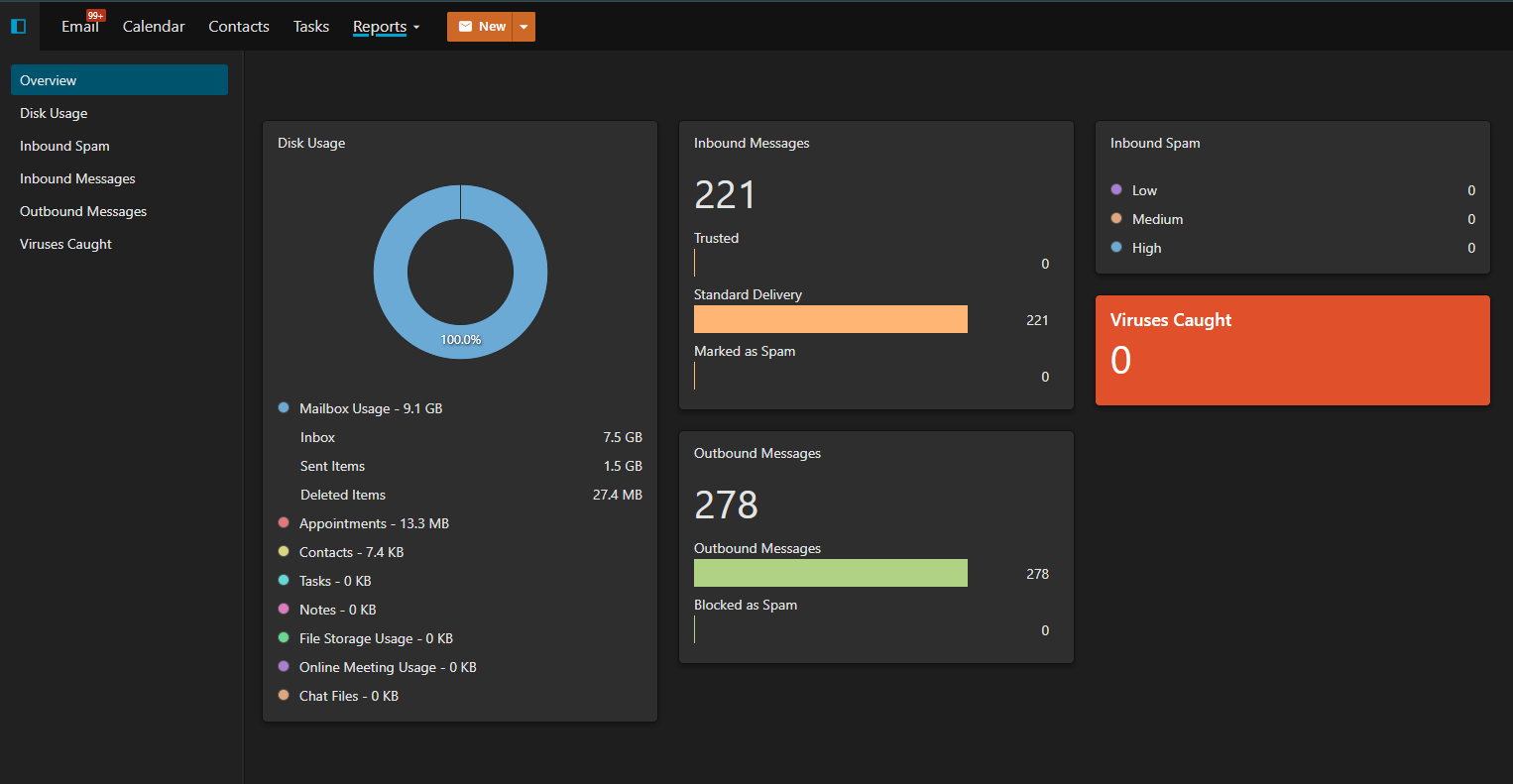
Step 4: View Detailed Folder Usage (Reports Tab)
To see a detailed breakdown of where mailbox storage is being used (for example Inbox, Sent Items, Deleted Items, Junk, etc), use the Reports section:
- Click Reports in the left-hand menu.
- Select Overview.
- Click the Disk Usage link.
The Disk Usage report shows:
- Mailbox usage by user
- Folder-level breakdown (Inbox, Sent, Deleted Items, Junk, and other folders)
- Which folders are consuming the most space
This view is especially useful for identifying issues such as:
- Large Sent Items folders
- Deleted Items not being emptied
- Junk folders growing unexpectedly
Common Questions
I don’t see the Reports or Domain options
This usually means your account is not a Domain Administrator. Please contact your internal IT/admin, or open a support ticket with us and include:
- Your domain name
- The email address you are logging in with
- What you are trying to check (mailbox or disk usage)
Do aliases or forwarding addresses use storage?
Email aliases do not have their own storage. Messages sent to an alias are delivered into a mailbox and count toward that mailbox’s usage.
Need Assistance?
If you would like help identifying large mailboxes, adjusting quotas, or cleaning up storage safely, please open a support ticket and our team will be happy to assist.
